

Last Updated: February 2026
If you work on federally funded construction, alteration, or repair projects, the WH-347 form is one of the most important compliance documents you'll deal with. It's the U.S. Department of Labor's standard certified payroll report, and getting it right is essential to staying compliant with the Davis-Bacon Act.
The form was recently updated with significant changes to how fringe benefits and apprenticeship documentation are reported. If you haven't already made the switch to the new format, time is running out; the old version becomes invalid after September 30, 2026.
This guide covers everything you need to know about the WH-347: what it is, what changed, and step-by-step instructions for filling it out correctly.
Navigate This Article
- What is the WH-347 Form?
- 2025 Updates and September 2026 Deadline
- How to Fill out WH-347: Step-by-Step
- How to Submit Your Certified Payroll Report
- Common Mistakes
What Is the WH-347 Form?
The WH-347 is the U.S. Department of Labor's standard certified payroll report form — sometimes referred to simply as the "department of labor payroll form" or "certified payroll form." Contractors and subcontractors working on federally funded construction, alteration, or repair projects are required to submit it weekly for each active project.
The form serves as proof that employees are being paid the predetermined prevailing wage; the minimum required compensation for workers on government-funded public works projects as established by the Davis-Bacon Act. It captures a detailed breakdown of each employee's wages, hours worked, job classifications, deductions, and fringe benefits.
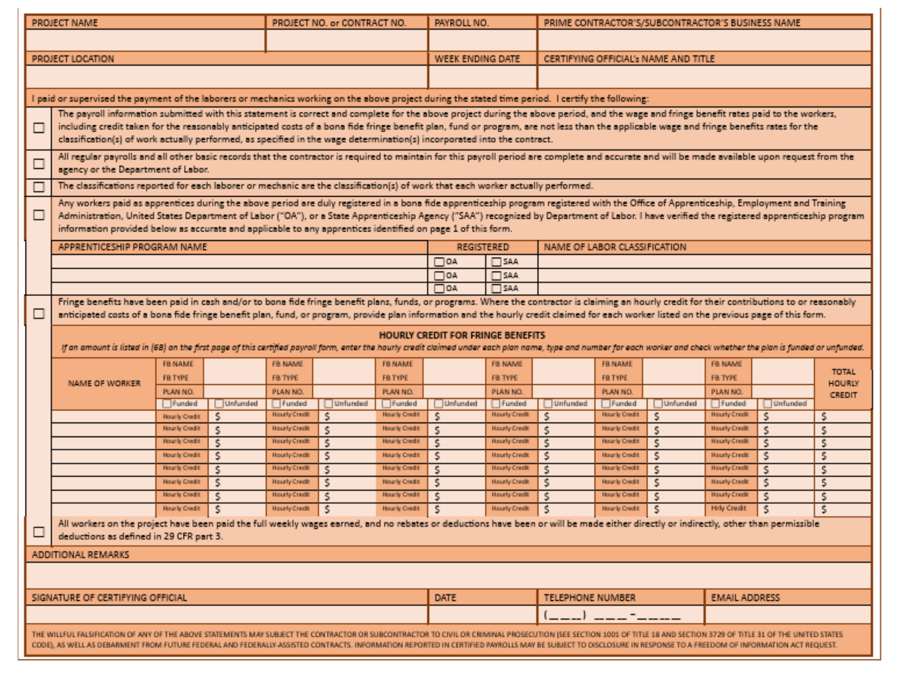
The WH-347 is a two-page form. Page 1 contains the contractor and project info, along with payroll details for every employee who worked on the project during the reporting week. Page 2 is the Statement of Compliance, where a company official signs and certifies that all information in the report is accurate and that employees have been paid in full accordance with prevailing wage requirements. Together, these two pages form the foundation of certified payroll compliance for any federally funded project.
2025 Form Updates and the September 2026 Deadline
The Department of Labor released an updated version of the WH-347 form that includes notable changes to how contractors report fringe benefits and apprenticeship documentation. These updates reflect evolving compliance requirements and provide more clarity on how benefit contributions should be recorded.
.png?width=900&height=675&name=WH347%20Form%20Graphics%20(1).png)
For a full breakdown of every change to the form, read our detailed article: WH-347 Updates: 2025 Certified Payroll Reports →
The key deadline to know: The old WH-347 form will be invalid after September 30, 2026. After that date, submissions using the outdated format will not be accepted. If you're still using the previous version, we strongly recommend making the switch now to avoid disruption to your projects.
It's also worth noting that these federal form changes are setting off a broader trend; states are beginning to update their own reporting formats in a similar manner. Staying ahead of the federal changes positions you well for what's coming at the state level.
For more on the timeline and what happens if you don't switch, see: Still Using the Old WH-347? Deadline Is September 2026 →
How to Fill Out the WH-347 Form: Step-by-Step Instructions
Whether you're completing the WH-347 manually or reviewing output from compliance software, it helps to understand what each section of the form requires. Below is a field-by-field walkthrough.
Header Section (Contractor Information)
The top of the form captures basic project and contractor information:
- Firm's Name: Enter your company name. Check the box indicating whether you are the contractor or a subcontractor.
- Firm's Address: Provide the address where the company is located.
- Payroll Number: This is sequential, starting with "1" for your first submission on the project and incrementing with each weekly filing.
- Week Ending: Enter the last date of the workweek covered by this report.
- Project and Location: Describe the project and its physical location.
- Project or Contract Number: Enter the contract number associated with the public works project.

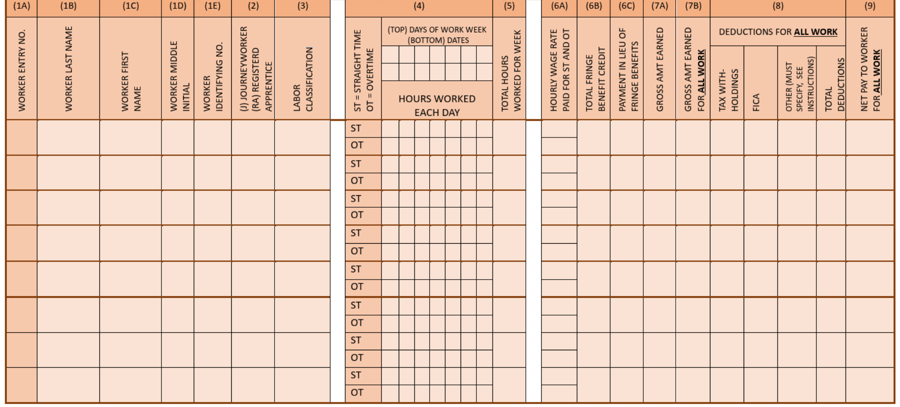
Page 1: Employee Payroll Details (Columns 1–9)
The body of Page 1 is where you record detailed payroll data for each employee who worked on the project during the reporting week.
- Column 1 — Name and Identifying Number: List each employee's full name and the last four digits of their Social Security number.
- Column 2 — Withholding Exemptions: Record the number of withholding exemptions claimed. Note that this column is not mandatory for compliance purposes — it's based on employee preference.
- Column 3 — Work Classification: Enter the type of work performed, such as electrician, laborer, carpenter, or other trade classification. Accuracy here matters — misclassifying an employee's work type is one of the most common WH-347 errors.
- Column 4 — Hours Worked (by Day): Break out daily hours into standard (S) and overtime (O). Any hours exceeding 40 in a week are typically classified as overtime.
- Column 5 — Total Hours: Sum of all standard and overtime hours for the week.
- Column 6 — Rate of Pay: Document the pay rate (hourly, daily, or weekly) including the overtime rate and any fringe benefit contributions. This is one of the sections most affected by the 2025 form updates.
- Column 7 — Gross Amount Earned: The total gross pay earned on the project for the week. If you're using software like Points North, this calculates automatically.
- Column 8 — Deductions: Record all deductions including FICA, withholding tax, and any other applicable amounts.
- Column 9 — Net Wages Paid: Gross amount (Column 7) minus total deductions (Column 8).
Page 2: Statement of Compliance
The second page of the WH-347 is where a company official certifies the accuracy of the payroll report. By signing, the contractor is affirming that:
- All information in the payroll report is correct and complete.
- Each employee has been paid at or above the prevailing wage required under the Davis-Bacon Act.
- Fringe benefit contributions have been accurately reported.
This signature carries legal weight. Inaccurate certifications can result in penalties, contract issues, or debarment from future federal projects.
How to Submit Your Certified Payroll Report
Completing the form is only half the process. Submitting it correctly, and on time, is equally important.
Review and verify all data before filing. Double-check employee details, hours, wages, deductions, and fringe benefits. Make sure calculations are accurate and supporting documentation is in order. It's much easier to catch and correct an error before submission than to amend a report after it's been filed.
Choose your submission method. Depending on the agency or contracting authority you report to, you may submit electronically or via hard copy. Electronic filing is typically the preferred and most efficient method when available. Some agencies have specific portals or systems they require you to use, so confirm the process before your first filing on a new project.
Retain your records. Keep copies of all filed reports, supporting documentation, and proof of submission. These records are essential for audits, future reference, and demonstrating ongoing compliance. Store them securely and in an organized manner for the required retention period. You may need to access them quickly if questions arise.
Follow up. After submission, check for confirmation of receipt. Stay current on any changes to reporting requirements at the federal, state, and local levels, and respond promptly to any notices or requests from the contracting agency.
Common WH-347 Mistakes to Avoid
Even experienced contractors can run into issues with their certified payroll reports. Here are some of the most frequent mistakes — and how to prevent them:
- Misclassifying employee work types. Each employee's classification in Column 3 must match the work they actually performed during the reporting period. If an employee performed multiple trades in a single week, they may need separate line entries for each classification. Mismatches between classification and actual work can trigger audits and compliance issues.
- Failing to separate standard and overtime hours. Hours in Column 4 must clearly distinguish between standard (S) and overtime (O). Lumping them together is a common error that can flag your report for further review.
- Using the old form format. After September 30, 2026, the previous version of the WH-347 will no longer be accepted. Switching to the updated form now avoids last-minute scrambling and ensures your reports are accepted without issue.
- Incomplete fringe benefit reporting. The 2025 form updates place greater emphasis on how fringe benefits are documented. Make sure contributions are broken out accurately in Column 6, including cash equivalents and any contributions to bona fide benefit plans.
- Filing out of sequence or missing weeks. Payroll numbers in the header should be sequential (1, 2, 3...) with no gaps. Missing a week of filing, even a week with no work performed, can raise red flags. If no work occurred during a reporting week, a "no work" payroll should still be submitted.
- Errors on the Statement of Compliance. The signature on Page 2 certifies everything on Page 1. Rushed or careless completion of the payroll details puts the signer at legal risk, as this certification carries the weight of a federal compliance attestation.

How Points North Simplifies Certified Payroll Reporting
Filling out the WH-347 manually is time-consuming, error-prone, and hard to scale, especially if you're managing multiple projects across different jurisdictions. Points North takes the complexity out of the process.
- Automated report generation in over 100 local, state, and federal formats; including the updated WH-347. Points North was among the first to adopt the new form format as soon as the changes were announced, and our team stays on top of these updates so you don't have to. That matters because many providers still haven't updated to the new format and aren't able to adjust quickly when form requirements change.
- Seamless payroll integration. Points North pairs with your existing payroll software to pull the data it needs, eliminating manual data entry and reducing the risk of errors.
- Reports generated and stored in minutes. What used to take hours of manual work can be done in a few clicks. With reports stored securely for easy retrieval during audits.
- Built for what's coming next. The federal WH-347 update is driving a wave of state-level reporting changes. With Points North, you're already positioned to adapt as new formats roll out, without skipping a beat.
Thousands of contractors across the country rely on Points North to simplify their prevailing wage reporting and stay compliant. Fill out the form below to schedule a demo to see how we can help your team.