

When wage rates are released late or projects are misidentified as subject to union or prevailing wage requirements after work has already begun, contractors often owe workers compensation for hours already worked at a lower rate. That obligation is retro pay: a calculated correction that covers the difference between what was paid and what should have been paid.
The triggers differ between union and prevailing wage work, but the calculation principles and compliance stakes are the same. A miscalculation in either environment can mean back-pay obligations, fund penalties and audit exposure that compounds the longer it goes unaddressed.
This guide covers how to identify when retro pay is owed, how to calculate it accurately for both hourly and salaried workers, and how to document corrections that hold up under scrutiny. For a broader overview of union payroll compliance obligations, see our Union Payroll Compliance guide.
Navigate This Article
- What is Retro Pay? And How Is It Different from Back Pay?
- Common Triggers for Retro Pay
- How to Calculate Retro Pay for:
- Documenting Retroactive Corrections
- Audits and Retro Pay
- Preventing Retro Pay Situations
- Frequently Asked Questions
What Is Retro Pay? And How Is It Different from Back Pay?
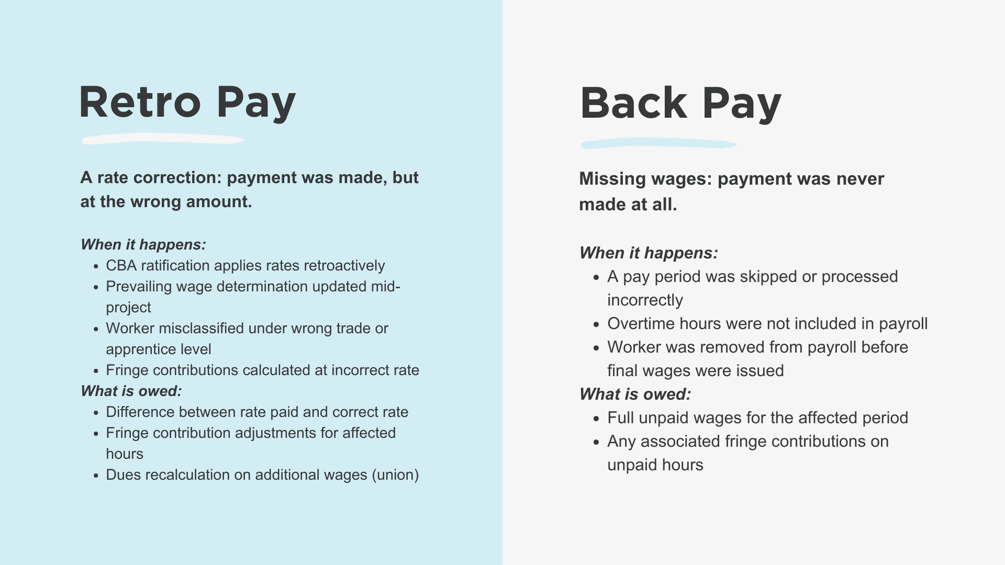
Retro pay is a rate correction. Payment was made, but at the wrong amount. Back pay, by contrast, means wages were never paid at all. The distinction matters because the calculation method and the urgency of resolution differ between the two.
In construction payroll, retro pay most commonly arises from rate changes on union or prevailing wage projects where a corrected rate applies retroactively to hours already worked. The worker received a paycheck, but that paycheck reflected a rate that has since been revised upward. The contractor now owes the difference.
What makes retro pay more complex in union and prevailing wage environments than in standard payroll is the fringe component. Retro pay is not just a wage adjustment. It triggers recalculation of benefit fund contributions or fringe benefit payments for the affected hours, and those corrections must be submitted to the appropriate funds or reflected in corrected certified payroll reports alongside the wage adjustment.
Common Triggers for Retro Pay on Union and Prevailing Wage Projects
Understanding what causes retro pay situations is the first step toward preventing them. The triggers are somewhat different depending on whether you are working under a collective bargaining agreement or a prevailing wage requirement.
Union Retro Pay Triggers
Late CBA ratification is one of the most common causes. When a new contract is finalized after its effective date, all hours worked since that date are subject to the new rates, which means contractors must calculate the difference for every affected worker going back to the effective date. Annual or mid-year rate increases published after their effective date create the same dynamic at a smaller scale.
Worker misclassification is another frequent trigger. An apprentice who has progressed to the next level, or a worker whose trade classification was coded incorrectly, may be owed the difference between what they were paid and what they should have earned under the correct classification. Missed or miscalculated fringe contributions discovered during an internal review or audit also create retro obligations that extend beyond base wages.
For guidance on staying current with rate changes before they create retro pay situations, see our [guide to finding and managing union pay scales].
Prevailing Wage Retro Pay Triggers
On prevailing wage projects, wage determination updates issued after project work has begun can require retroactive application of new rates to hours already worked. Worker misclassification is equally common here: a worker performing duties under the wrong wage determination classification may be owed the difference between the rate paid and the rate that should have applied.
Geographic errors create retro pay situations when work is coded to the wrong county or wage determination area, resulting in underpayment against an agency's rate. Fringe benefit underpayment is also a significant trigger on prevailing wage projects, particularly when cash fringe is paid at a rate lower than the applicable wage determination requires. And like union audits, agency compliance reviews frequently surface errors that require retroactive correction.
How to Calculate Retro Pay for Hourly Workers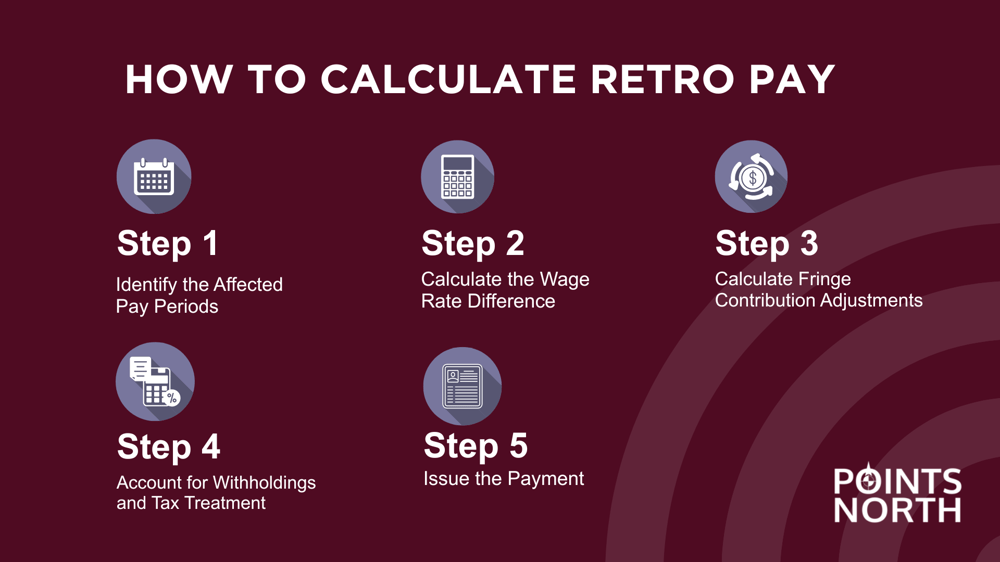
The calculation follows a consistent sequence regardless of whether the project is union or prevailing wage. Each step builds on the previous one, so accuracy early in the process protects the integrity of everything that follows.
Step 1: Identify the Affected Pay Periods
Start by determining the rate change effective date and identifying every pay period where the old rate was applied. Pull hours by worker, classification and work location for each affected period. If the rate change falls mid-pay-period, split hours by date before moving to any calculations.
For prevailing wage projects, confirm which wage determination applies to each affected period and whether a superseding determination was issued during the project. Wage determination updates have specific effective dates, and applying the wrong determination to a given period creates a new error on top of the original one.
Step 2: Calculate the Wage Rate Difference
The core calculation is straightforward: the new rate minus the old rate gives you the hourly retro pay amount. On a union project, if the new journeyman rate is $51.00 and the paid rate was $48.50, the differential is $2.50 per hour. On a prevailing wage project, if the updated wage determination rate is $54.00 and the paid rate was $51.25, the differential is $2.75 per hour.
Apply that differential to straight-time hours first. Then check the applicable CBA or wage determination for how overtime hours are treated. Most agreements require the differential to be applied to overtime hours as well, at the applicable multiplier, which means a $2.50 straight-time differential becomes $3.75 for any overtime hours in the affected period.
Step 3: Calculate Fringe Contribution Adjustments
This is where many contractors underestimate the full scope of their retro obligation. The wage correction is only part of what is owed.
For union projects, recalculate health and welfare, pension, training and vacation fund contributions for the affected hours using updated rates. Remember that pension contributions may apply to straight-time hours only, so be careful not to apply pension rates to the full hours including overtime unless the fund rules require it. For a refresher on fringe calculation methods by fund type, see our [step-by-step union payroll processing guide].
For prevailing wage projects, recalculate fringe benefit payments or bona fide plan contributions based on the corrected rate. If fringe was being paid as a cash equivalent, recalculate the cash fringe differential for the affected hours.
In both cases, the total retro obligation for each worker is the wage differential plus the fringe differential across all affected pay periods.
Step 4: Account for Withholdings and Tax Treatment
Retro pay is taxed the same as regular wages. It is not taxed at a higher rate. It may appear larger on a paycheck because it covers multiple prior periods paid in a single amount, but the tax rate itself does not change. Withhold and remit taxes on retro pay the same way you would on regular wages.
For union projects, verify whether dues apply to retro pay under the applicable CBA. Most agreements require dues on all wages including retroactive adjustments, so the additional wages will generate an additional dues obligation. For retro pay amounts that are significant, have your payroll team or a CPA confirm the withholding treatment before issuing payment.
Step 5: Issue the Payment
Retro pay must be issued as a separate off-cycle payment rather than folded into a regular payroll cycle. Notify affected workers that an adjustment is being made and when they can expect to receive it.
For prevailing wage projects, this step includes submitting corrected certified payroll reports to the awarding agency reflecting the adjusted wages and fringe amounts. Corrected reports should clearly indicate the pay periods being corrected and the reason for the adjustment.
Update all payroll records to reflect the correction before closing out the period, and retain documentation of the calculation and payment as part of your compliance records.
How to Calculate Retro Pay for Salaried Workers
Salaried retro pay situations are less common in construction but do arise for supervisory or administrative roles covered under a CBA or prevailing wage classification. The approach mirrors the hourly calculation with one additional step.
Establish the hourly equivalent by dividing the annual salary by the total annual hours defined in the CBA or applicable work schedule. If the CBA defines a 2,080-hour work year and the employee earns $75,000 annually, the hourly equivalent is $36.06. Apply the rate differential against that hourly equivalent for each affected hour, then follow the same fringe and withholding steps as you would for hourly workers. The fringe and dues obligations are calculated the same way regardless of whether the worker is paid hourly or on salary.
Documenting Retroactive Corrections
Getting the calculation right is essential, but documentation is what protects you if questions arise later. Incomplete records are one of the most common reasons a well-intentioned correction still results in penalties during an audit.
For union projects, maintain a written record of the rate change including the effective date and source, whether that is a CBA amendment, a union notice or a wage determination update. Keep recalculation worksheets that show the old rate, new rate, differential, affected hours and total owed per worker. Retain updated fund remittance reports reflecting the corrected contribution amounts alongside confirmation of payment to workers and submission to affected funds.
For prevailing wage projects, keep the applicable wage determination and any superseding determination with their effective dates. Corrected certified payroll reports submitted to the awarding agency should be retained along with your recalculation worksheets and evidence of payment to affected workers.
Retain all of these records according to CBA requirements and applicable law. Three years is the common minimum, but some CBAs and prevailing wage regulations require longer retention periods. When in doubt, keep more rather than less.
Audits and Retro Pay
Retro pay errors are among the most common findings in both union payroll audits and prevailing wage compliance reviews, and for a straightforward reason: auditors know exactly where to look. In union audits, the process involves cross-referencing time records against rate schedules for the audit period. Rate changes that were not applied correctly show up immediately. In prevailing wage reviews, agencies compare certified payroll reports, employee paychecks, and paystubs against applicable wage determinations and look specifically for classification errors and fringe underpayments.
The single most important thing to understand about audits and retro pay is the difference between proactive correction and discovered error. Contractors who identify a retro pay issue, calculate the correct amounts and submit corrections before an audit demonstrate good faith. That matters. Agencies and fund administrators regularly handle proactive corrections as administrative matters. Errors discovered during an audit, particularly if the affected period is long or the amounts are significant, are treated differently and can result in penalties and interest charges on top of the underlying obligation.
Preventing Retro Pay Situations
The most effective way to manage retro pay is to reduce the circumstances that create it. No contractor can prevent a retroactive rate change in a newly ratified CBA or a superseding wage determination, but the window between when a new rate takes effect and when it is applied in payroll is something you can control.
Rate management systems that automatically update wage schedules when new union rates or prevailing wage determinations are published substantially reduce that window. When rates are updated in your payroll system the day they are published rather than the next time someone manually checks, the exposure period shrinks to near zero.
Verification checkpoints at the start of each pay period catch rate changes before they compound. A brief review of whether any rate updates have been issued for the unions and wage determinations on your active projects takes minutes per period and prevents corrections that can span months of payroll. A more formal quarterly review of rate schedules against current CBAs and wage determinations catches anything that slipped through the per-period checks before it grows into a significant correction obligation.
For guidance on tracking and sourcing current union rates, see our guide to finding and managing union pay scales. For pay period verification checkpoints, see our step-by-step union payroll processing guide.
Automate Rate Tracking with WageIQ
WageIQ by Points North houses current union pay scales and prevailing wage rates across multiple projects and locals. When a rate change is identified, contractors can bring in negative and positive hours and process a correction payroll run directly within the system so corrections are handled accurately and efficiently. Learn more about WageIQ Rate Management.